


In U.S. courts, there’s an uncomfortable reality: video doesn’t lie – but it can be ruled inadmissible.
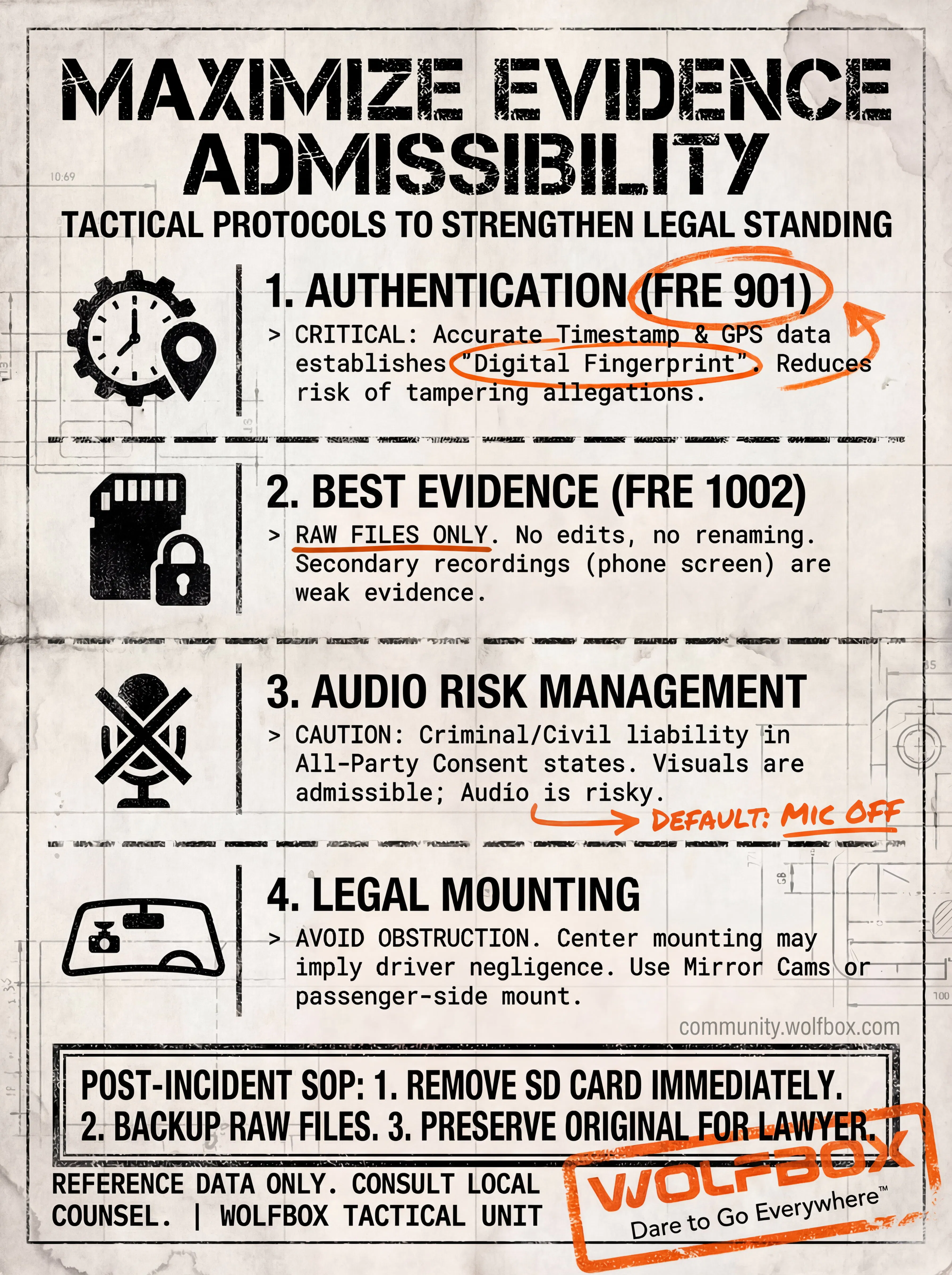
A clip can show a crash from start to finish and still be limited or rejected by a judge if it doesn’t meet the rules of evidence. Under Federal Rule of Evidence 901, the first questions are not “Who hit whom?” but:
What exactly is this video?
When was it taken?
Where was it taken?
Is there a reasonable basis to believe it hasn’t been altered?
If your dash cam settings are off, or the way you handle the footage after a collision raises questions, that “perfect clip” may end up treated as background material rather than strong evidence.
If you want your WOLFBOX to behave more like a black box for your vehicle than just another gadget, these are four key elements worth locking in.
Keywords: Timestamp, Metadata, GPS, FRE 901 /
From an evidence perspective, the first hurdle is authenticity:
Is this clip really from the date, time, and place you say it is?
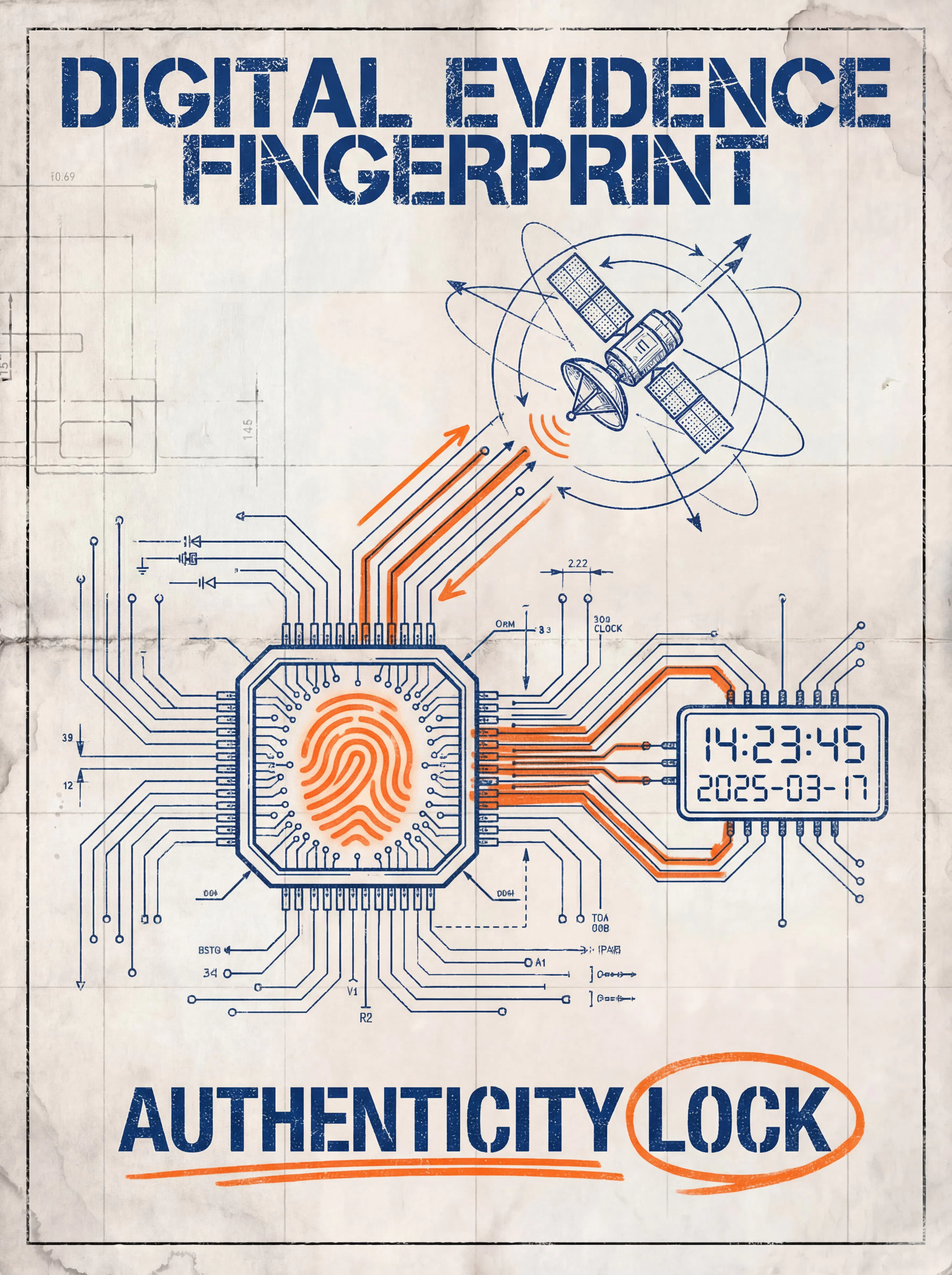
If a crash happens in November 2025 but the overlay in the corner still shows 2021/01/01 because the camera reset after losing power, opposing counsel has a simple line of attack:
“The date is clearly wrong. It’s hard to rely on the rest of this recording.”
To reduce that risk, your footage needs a consistent digital fingerprint.
Practical steps:
Set and verify regularly
Make a habit of checking that the date, time, and time zone are correct, especially after power loss or firmware updates.
Keep the timestamp visible
Leave the on-screen date/time stamp enabled. Turning it off for aesthetics makes it harder to show when something happened.
Use GPS watermarking when available
If your unit supports it, enable GPS watermarking. Coordinates and speed data can help support statements like “I wasn’t speeding” or “I was stopped at the time of impact,” and help tie the clip to a specific location.
Keep supporting data where possible
Some systems also save route/track files. These can provide additional context if there is ever a question about how and where you were driving.
Once those pieces are in place, your clip looks much more like something that can satisfy an FRE 901 authenticity inquiry, rather than just “a random crash video.”
Keywords: Best Evidence Rule, FRE 1002
The classic mistake:
Filming the dash cam screen with your phone.
Trimming the clip inside an app to “just the important part.”
Renaming or compressing files before anyone has reviewed the original.
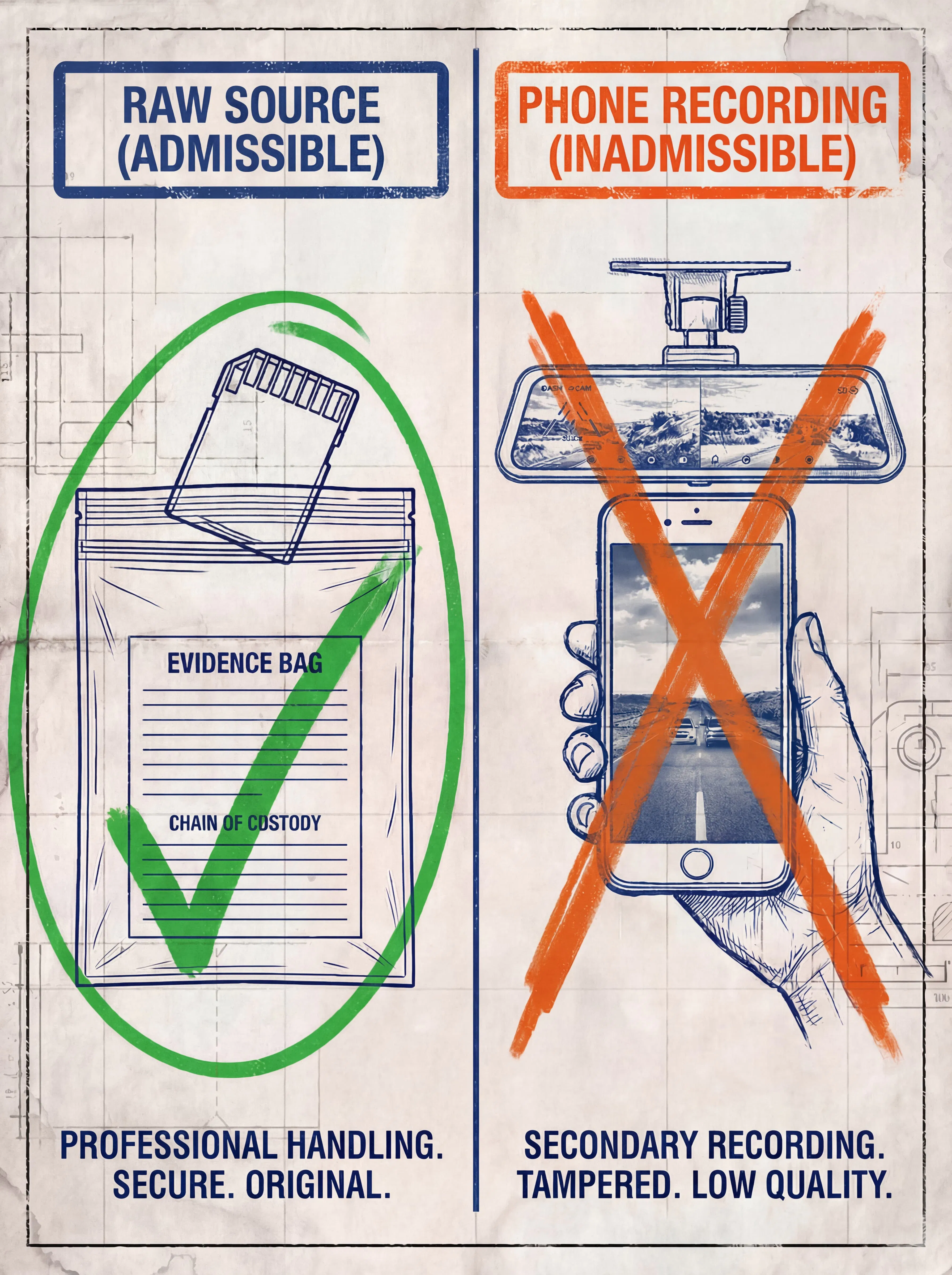
Under the Best Evidence Rule (FRE 1002), courts generally prefer the original recording when the content of that recording is in dispute. A secondary copy – especially one that’s been cropped, edited, or re-encoded – is much easier to challenge as incomplete or potentially misleading.
More cautious practice:
Favor raw footage
Export and preserve the original file from the SD card before doing anything else.
Avoid altering the evidence copy
Don’t rename, re-encode, or add filters/overlays to the version you may need as evidence. If you want to edit a version for social media, keep that separate.
Keep context, not just the impact
Save 1–3 minutes before and after the incident when possible. Continuous footage does a better job showing how you were driving than a clip that starts right at the moment of impact.
When sending the clip to an insurer or lawyer:
Make a full backup of the SD card.
Copy the original files via computer (keeping the original folder and file names) and send those copies.
You can still create edited highlights for personal use, but if there is a dispute, it’s usually the unedited recording that matters most.
Keywords: Wiretapping Laws, One-Party vs All-Party Consent States
With dash cams, video and audio are not treated the same way.
Video (on public roads):
Recording what happens on public roads is generally lawful when you are not intruding on a reasonable expectation of privacy.
Audio (inside the cabin or in conversations):
This is where wiretapping and eavesdropping laws come into play.
Roughly a dozen U.S. states – including California, Florida, Illinois, and Pennsylvania, among others – are all-party consent states. In those places, recording a private conversation without everyone’s consent can violate state wiretap laws.
In practice, this can mean:
Your audio track may face additional challenges if someone objects to it; and/or
The act of recording itself could create a separate legal issue you didn’t intend to raise.
Practical rules of thumb:
Default to OFF when you’re unsure
If you often cross state lines or you’re not fully familiar with local audio-recording rules, it’s safer to keep the mic off by default. For most collisions, the video is what you will rely on for reconstructing what happened.
If you choose to record audio (e.g., rideshare, fleet, or commercial use):
Post a clear in-vehicle notice such as “Audio & Video Recording in Progress.”
Briefly let passengers know when they enter that recording is active.
Check the rules for your specific state regarding recording conversations.
We’ve also compiled a separate state-by-state overview of audio-consent rules you can review before deciding whether to keep your mic on.
Keywords: Windshield Obstruction, CVC 26708, Line of Sight
Evidence isn’t just about what you captured; it also depends on how the camera was installed.
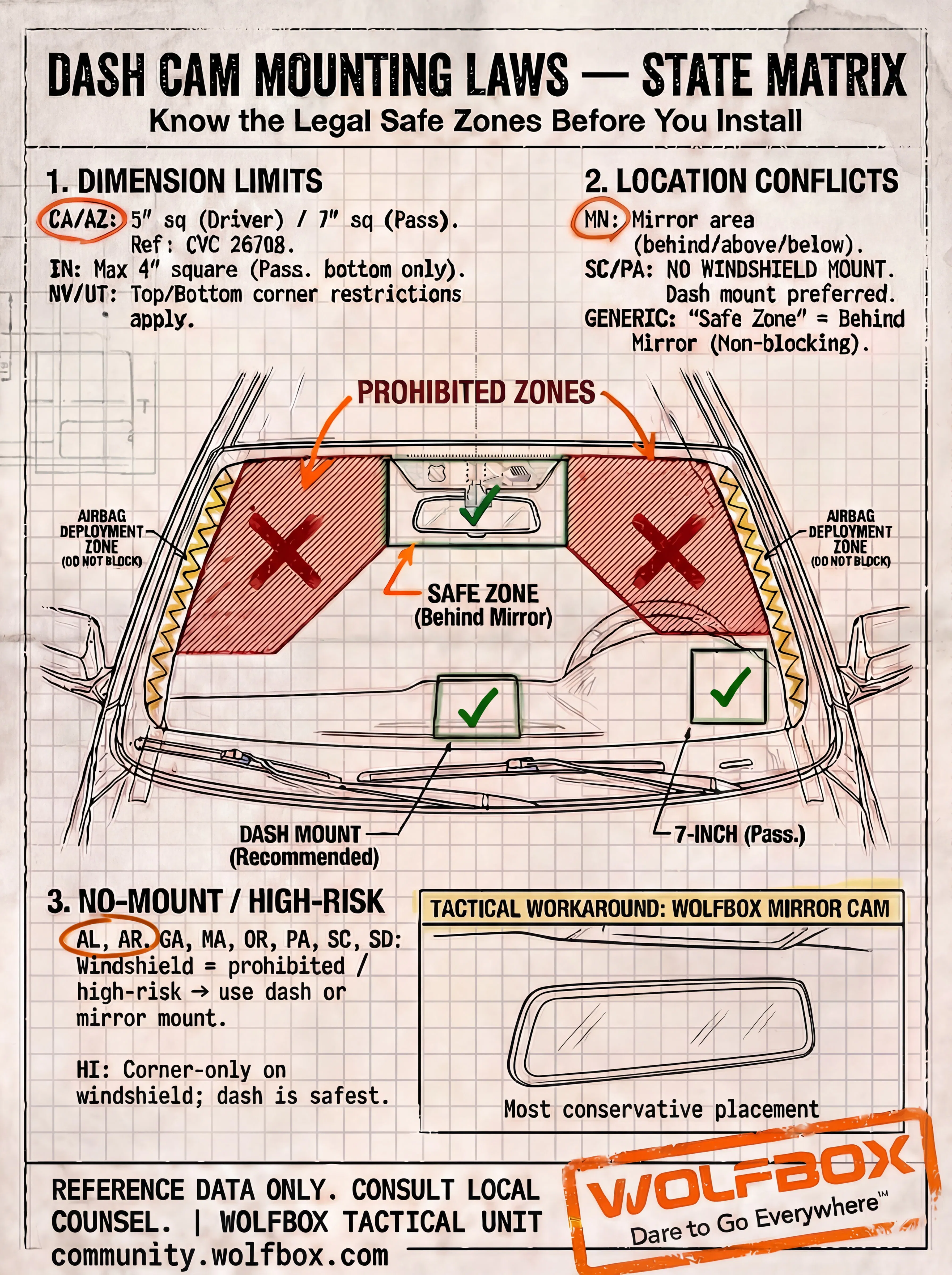
If your dash cam clearly violates local windshield obstruction laws – for example, mounted in the middle of the glass or in an airbag deployment zone – an insurer or opposing attorney may argue:
“The driver’s view was partially blocked by this device, and that contributed to the crash.”
In states that use comparative negligence, that kind of argument can affect how fault is allocated.
What to pay attention to:
Look up your state’s rules
Search for phrases like “windshield obstruction statute,” “dash cam mounting law,” or specific provisions such as “CVC 26708” (for California).
Some states limit devices to small areas near the lower corners or upper center of the windshield.
Others describe acceptable mounting zones around the rearview mirror.
Avoid obvious “red zones”
Don’t mount the camera in the center of your primary field of view.
Avoid known airbag deployment areas.
Favor lower-profile mounting options
Behind-mirror placement: Mounting the device behind or immediately around the rearview mirror tends to keep it out of the driver’s line of sight and can align better with how some states describe “permitted equipment” in that area.
Dashboard mounting: In stricter states where windshield-mounted devices are heavily restricted or disfavored, a low dashboard mount can be a more conservative choice if it doesn’t block the view.
Mirror-style dash cams: Because they clip to or replace the rearview mirror rather than sticking directly to the glass, they can help avoid some windshield-adhesion issues when installed correctly.
After installation, a quick two-step self-check helps:
In your normal driving position, does the device interfere with your view of signals, pedestrians, or cross-traffic?
If an officer looked in from outside, would the mount appear reasonably out of the way, or obviously intrusive?
We’ve also created a state-by-state mounting overview that you can reference when setting up or adjusting your kit.
Before – and especially after – a serious incident, walk through these four questions:
Is the time right?
Are date, time, and time zone set correctly? Is the timestamp visible in the footage?
Is the file “clean”?
Is the original SD-card file preserved? Have you avoided renaming, trimming, screen-recording, or re-encoding the only copy?
Do I really need audio?
Do you understand the audio-consent rules where you are driving?
If not, is the mic off by default?
Is my mounting location defensible?
Is the camera outside your main line of sight and airbag areas?
Does the placement fit within what your state’s obstruction rules allow or recommend?
A dash cam isn’t automatically a legal shield just because it’s installed.
The more consistently you follow these basic principles, the more likely it is that your WOLFBOX footage will hold up when you really need it.
Disclaimer:
This post is for informational purposes only and does not constitute legal advice. Dash cam and recording laws vary by state and change over time. For questions about a specific case or jurisdiction, please consult local regulations or a licensed attorney.
